|
|
 Let’s Add New Trucks to Your GG1 Let’s Add New Trucks to Your GG1
By John D'Angelo
This article is a bit more than a regular Download Gold article. In addition to getting items of interest from the Trainz Download Station (DLS), it examines how to add custom items to a locomotive using Content Manager Plus (CMP) and also how to deal with some error messages that you might experience.
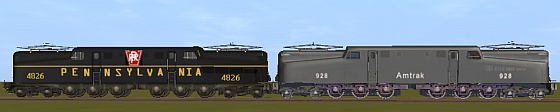
PRR GG1 with standard trucks Amtrak GG1 with detailed trucks
The GG1 is one of my favorite locomotives. It was used by the Pennsylvania Railroad and others to travel along tracks where electrification had been made by using overhead wires. I remember a time when I was a child that I traveled out of Pennsylvania Station to Chicago. A GG1 electric locomotive headed our train west out of New York City until a steam K4s 4-6-2 locomotive took over. They were two beauties that I’ll never forget.
The GG1 was also a favorite model of the Lionel Corporation. As you can see from the above picture, the GG1 is also a popular model in Trainz. If you look closely at the picture, you can see that besides being different GG1’s, their trucks are also different.
The Amtrak GG1 ; by Magicland, kuid: 58843:271, has highly detailed trucks and the Pennsylvania Railroad GG1 #4826; by Corporal Major, kuid: 178941:1732, has the standard Trainz trucks which are not highly detailed.
Magicland’s model is using detailed trucks that were created by Whitepass. He made two sets of trucks, or bogeys as they are known in Trainz:
GG1 Bogey 0 kuid:58422:50111
GG1 Bogey 1 kuid: 58422:50112
You can download the trucks from the DLS separately or you can download Magicland’s GG1 which has them installed, and let the Download Helper get the bogeys. I chose to download Magicland’s GG1. This served the purpose of getting a GG1 which had the trucks already installed and allowed me to use his config.txt file as an example to help me install the trucks on another GG1.
I then downloaded Corporal Major’s Pennsylvania GG1 to use as the model to add the trucks/bogeys to. Since this is a PaintShed item, you need to have PaintShed, which is standard with TRS2006.
To do the work of changing the trucks, I used CMP in TRS2006. If you work in TRS2004, you would use TrainzObjectz. There is one caviat I have for you. These trucks were created before TRS2006 and although they work fine, TRS2006 does generate an error message (black screen warning) if you start a session with the modified GG1. We’ll go over that problem, but first we will add the trucks.
Listed below is the original config.txt file for Corporal Major’s GG1 which is based on the PaintShed model:
| category-class |
"AD" |
| pantograph |
<kuid:-1:100838> |
| engine |
1 |
| fonts |
1 |
| interior |
<kuid:-1:101474> |
| mass |
203000 |
| origin |
"US - UNITED STATES" |
| interior |
<kuid:-1:101474> |
| mass |
203000 |
| origin |
"US - UNITED STATES" |
| product-id |
"paintshed" |
| product-version |
1.4 |
| product-type |
"reskin" |
| kind |
"traincar" |
| enginespec |
<kuid:-1:42004205> |
| enginesound |
<kuid:-1:42003002> |
| hornsound |
<kuid:-1:42003101> |
| alias |
<kuid:-13:139> |
| kuid |
<kuid:178941:1732> |
| paintshed-template-used |
<kuid:-13:139001> |
paintshed-skin-used |
<kuid:-13:139000> |
| username |
"Pennsylvania Railroad GG1 No 4826" |
description |
"paintshed skin of Pennsylvania Railroad GG1 No |
| 4826" |
|
| category-region |
"US" |
| category-region "US"
category-era |
"1940s;1950s;1960s;1970s;1980s" |
| trainz-build |
2.5 |
| author |
"corporal_major" |
| contact-email |
"[email protected]" |
| trainz-build |
2.5 |
| author |
"corporal_major" |
| contact-email |
"[email protected]" |
| mesh-table { |
|
| |
default { |
|
| |
mesh |
"gg1_body/gg1_body.pm" |
| |
auto-create |
1 |
| |
} |
|
| |
shadow { |
|
| |
mesh |
"gg1_shadow/gg1_shadow.pm" |
| |
auto-create |
0 |
| |
} |
|
| } |
|
| bogeys { |
|
| |
0 { |
|
| |
bogey |
<kuid:-1:100839> |
| |
reversed |
0 |
| |
} |
|
| |
1 { |
|
| |
bogey |
<kuid:-1:100839> |
| |
reversed |
1 |
| |
} |
|
| |
2 { |
|
| |
bogey |
<kuid:-1:100840> |
| |
reversed |
0 |
| |
} |
|
| |
3 { |
|
| |
bogey |
<kuid:-1:100840> |
| |
reversed |
1 |
| |
} |
|
| } |
|
| thumbnails { |
|
| } |
|
| thumbnails { |
|
| |
0 { |
|
| |
image |
"preview.jpg" |
| |
width |
240 |
| |
height |
180 |
| |
} |
|
| } |
|
| kuid-table { |
|
| |
0 |
<kuid:-1:100838> |
| |
1 |
<kuid:-1:101474> |
| |
2 |
<kuid:-1:42004205> |
| |
3 |
<kuid:-1:42003002> |
| |
4 |
<kuid:-1:42003101> |
| |
5 |
<kuid:-13:139> |
| |
6 |
<kuid:-13:139001> |
| |
7 |
<kuid:-13:139000> |
| |
8 |
<kuid:-1:100839> |
| |
9 |
<kuid:-1:100840> |
| |
} |
|
Continue
Prev | 1 | 2 | Next
Article and screen shots �2008 Alfred Barten. All rights reserved.
More Articles:
If you want to be notified when a new article arrives, join the VR-News group at Yahoo. This group is purely for notification. Anyone can join; only the moderator can post.
|
