|
VMRJ In control with Train Dispatcher 3 By Don Hughes
There�s a breed of model railroader that would prefer to sit at a console and throw switches and set blocks than be a throttle jockey. Of course, there�s also that ultimate power of life and death such a person has over his constituents. �Nobody goes until I say so!� This is equivalent to the real-world job of the dispatcher, at least in pre-computer days. Although the computer has somewhat removed this task from mere humans, it has provided the means to build a simulation to enable anyone to try their hand at controlling a Class 1 railroad division. One such simulation is called, of all things, Train Dispatcher. It was developed by Signal Computer Consultants of Pittsburgh, Pennsylvania. Train Dispatcher is in its third version and can be purchased at http://www.signalcc.com for $45. It comes with seven territories you can start with. You can download Train Dispatcher directly from Signal�s web site or you can request a CD-ROM be sent to your home. The file size of the Setup program is a little over 1.5 MB and the installed program takes a little under 5 MB of hard disk space. The game is neither CPU nor graphic intensive, so it is right at home on a low-end desktop or a laptop computer. If you use a laptop, make sure you have an external mouse attached. You will need fine control over the cursor motion to make some things happen. Any revisions to the game are available for download at the web site at no cost. The game is currently at revision 3.5. 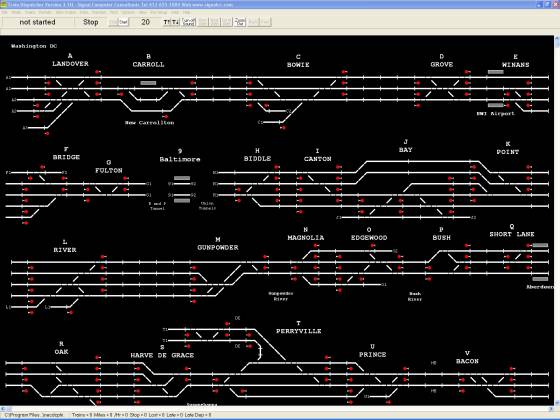
Northeast Corridor, South, part 1; classic display. 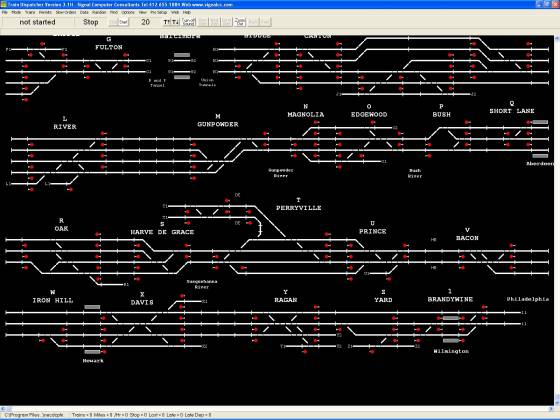
Northeast Corridor, South, part 2; classic display. In addition, Signal maintains a file library of territories developed and submitted by users of the program. The territories are representations of railroad trackage on a large scale, sometimes hundreds of miles. The territories also contain the traffic and other little things that play out on those tracks. The territory files are divided into two categories -- fee and free. The payware territories generally run $7 apiece. By my count there are 117 U.S. territories for purchase, 1 Australian, and 22 European. Available at no cost for download are 60 U.S., 2 Australian, 21 European, and 13 fictitious territories. Signal also has a User�s Manual you can download free of charge. If you are still sitting on the fence about whether or not to purchase, download the manual and get the real detail. 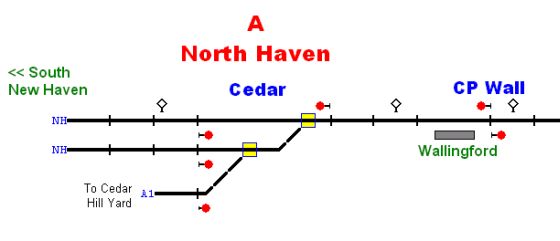
Detail from Amtrak, New Haven -- Springfield add-on territory. Screen shot by Alfred Barten. Speaking of decisions, Signal has pretty well removed any questions you may have because they offer a Demo game for download at no cost. As far as I can tell, it is the fully functional game with only an internal timer added that shuts it down after two to five hours. That�s simulated hours, not clock. It may terminate the game before you really can get into the flow but it will pretty well show you exactly what it�s about. The normal format for a territory is a set of scenarios lasting 24 hours with 7 variants for each day of the week. This enables you to start with a Saturday or Sunday session to get familiar with the territory before hitting the regular workweek. The visual rendering of the territory is very similar to the photographs you have probably seen of huge wall-mounted track schematics of prototypical dispatching facilities. They have two versions that are user-selectable -- classic and, well, non-classic. The layouts are quite similar but the representation of traffic is different. The classic is a representation of a �classical� dispatcher�s board and the other has more graphical representations. You will probably become attached to one or the other early on and it isn�t too easy to swap after you�re used to one. There are so many options about what to do, what to show, etc. that I�m not going to try to go into much detail about operating the game. The User�s Manual will far outdo anything I would write. Even though I�ve had the game for quite a while, I haven�t really graduated much above the �out of the box� level. I get all the challenge I need there without throwing in some extra monkey wrenches. When you open the program for the first time, it will load the Delaware, Lackawanna & Western section between Scranton, Pennsylvania, and Dover, New Jersey, circa 1958. It just happens that this is pretty much my favorite scenario to play. Its timeframe allows all sorts of traffic: first-class passenger, commuter, time freights, peddlers, etc. It also has a nice mix of single- and double-track sections. There are also a couple of Northeast Corridor sections, two Southern Pacific segments in Oregon, a BC Rail territory near Vancouver, and an Australian railroad in New South Wales available. First thing you do is tell the program which day you want to simulate and then your shift begins. 
Delaware, Lackawanna & Western Railroad, 1958. The simulation does more than run trains. It also takes into account the need for track inspection and maintenance. One nice thing about Saturday and Sunday is that most of those track people have the weekend off. Come Monday, however, those track permit requests have a way of coming up at the most inopportune times. I�ve even seen permits issued to allow crews to get cattle off the tracks. My most dreaded event is the announcement that a train�s crew is about to go outlaw. The game gives you a two-hour (simulated, remember) warning unless, of course, they come on your territory near the end of their twelve-hour shift. For me, this is an automatic freeze of the clock. As a dispatcher, you have to figure out just where to send their replacement crew to meet them and at what time. Heaven help you if you misjudge and they time out in the middle of the main line. My most common operational error is in the entry of the time for the meet. The minimum time is 30 minutes from the current time. However, the game defaults to a two-hour wait. I often add thirty minutes to their displayed time and voila! I have just set a meet two and a half hours in the future. If I could get one change into the game, I would default the meet time either to the current time or to thirty minutes in the future rather than the two hours. You have the ability to display all the active trains, permits, and slow orders as well as those scheduled for the next eight hours. Window management can become a nuisance if you keep too many open simultaneously. You may be the master of all you survey, but you better have a plan for what you�re going to do next or things can become a mess very quickly. By the way, you can save your run anytime you want so you can always go back and do something again if it gets too bad. One of the most important tools available to you as a simulation dispatcher is your variable clock. You can select a variety of clock rates from 1:1 to 40:1 (i.e., forty times normal time). At this rate, you can complete your 24-hour shift in 36 minutes but you better be an octopus. You also have the ability to stop time for as long as you like. This can be a lifesaver, not only for potty breaks, but also to get a chance to sit back and study what�s coming up and plan, plan, and plan some more. At 4:1 and below, things generally happen at a nice leisurely pace, though there�s also a good deal of dead time. After a few runs, you�ll start getting a feel for just how fast to run to keep things interesting. The ratio can be changed at any time during the exercise so you can set 20:1 in the wee hours of the morning and reduce to 8:1 when the commuter trains start running. As you would expect, the track is broken into blocks. Groups of blocks make up what I�ll call super blocks. Signaling within the super blocks is automatic, but the dispatcher has to control the entry into the super blocks. Switches at passing sidings and branches are under dispatcher control. Industrial spurs and sidings are manual and don�t have any effect at our level of visibility. The game usually does not show yards since they are normally under the control of a yardmaster and not the dispatcher. There are four different ways to set paths and signals, but that�s not for this discussion. Suffice to say that you need to be able to use all of them because they can make your job much easier. Some trains just run from one end of the territory to the other and disappear. However, others have business to conduct along the way. Placing the cursor on a train symbol will display several pieces of information about the train including where its next stop is. If the train is a freight, then it probably is going to work some industrial area. You have the responsibility to make sure it gets routed into a siding where it won�t interfere with Train Number 1 coming up right behind it. Each block of track has a name assigned to it so you can locate where the freight train should be routed. Place your cursor on a track block and its identity will be displayed. Trains automatically stop at their assigned blocks as long as you set the path to get them there and will restart after the proper delay. The delay could be anywhere from a couple of minutes to hours. There may be more than one block assigned the same name so you can service the area from multiple locations at the same time. Another little thing to deal with is helper locomotives. It takes a little while to get the hang of working with them, and there does not appear to be a consistent process to follow. For example, on my beloved DL&W;, the eastbound helpers cut off automatically at the crest of the grade while the westbound helper will merrily run off the end of the territory if you don�t cut it off manually and send it home. Right-clicking a train symbol opens a context menu of applicable actions. You will need to be familiar with Pass Next Red Signal, Merge Trains, Split Trains, and Reverse Direction when dealing with helpers. Make it a habit to place the cursor on each train as it comes on the territory to find out what it is, where it is going, and where it stops along the way. Some trains, especially passenger, will stop at multiple locations on their way through your territory so you have to check it after each stop to find out if there is another stop scheduled. You can also right-click the train symbol and then Train Properties and you will have access to a complete summary of the train�s activities. Block permits shut down track sections for a specified amount of time in order to perform some task such as replace ties or chase cows. As the dispatcher, you have to weave these interruptions into the big picture so the traffic is not adversely affected and the permit task gets done. The permit request is programmed to come up at a particular time, but you can either approve or delay it. If you delay the activity, the requesters will be persistent about asking again and again until they get their approval. Sometimes you just have to bite the bullet and let them do their thing. The program produces alerts for several events that occur: train stopped at signal, crew change scheduled, train entered the territory, track permit active, etc. They help to keep the dispatcher aware of little things that might become big things if left unattended. My installation of the game sounds a chime whenever an alert occurs. The program has an option to assign a .wav file to an alert type and override the chime. This makes it easier to keep track of alerts as long as you don�t go bonkers hearing the same voice over and over. When I downloaded the Demo version for this review, I was pleased to see that Signal had included a set of .wav files with it. I simply copied them over to my full installation and assigned them to the alerts through the Options menu. It is possible, even probable, that Signal is including those .wav files with any newly purchased full version of the game. One shortcoming perhaps is that there isn�t any scoring at the end of the day. When you have had that exceptional run, it�s nice to have someone pat you on the shoulder and say �Well done!� There is some accumulated data along the bottom of the screen but it isn�t all that easy to interpret. Signal Computer Consultants also produces a program called Track Builder. This is a companion to Train Dispatcher and provides the tools to build and modify territories for the dispatching program. This package runs $55, but from the number of territories available for download, it would appear that a good number of people have invested in it. Don Capsule summary Title. Train Dispatcher 3 Author. Signal Computer Consultants Platform. Windows 95 or higher, including NT 3.51 and 4.0 Description. Realistic simulation of a dispatcher�s job on a Class 1 railroad Availability. $45 at http://www.signalcc.com File Size. 1.5 MB zipped; <5 MB installed Price. $45 Prototype Info. The Dispatcher�s Office at http://www.linkline.com/personal/gnoller/ A full copy of Train Dispatcher 2 with five territories is available for free download at http://www.softrail.com -- Ed. Article and screen shoots �2003-2004 Don Hughes. All rights reserved. |